
Total gross sales
The money in and the money out, at a glance
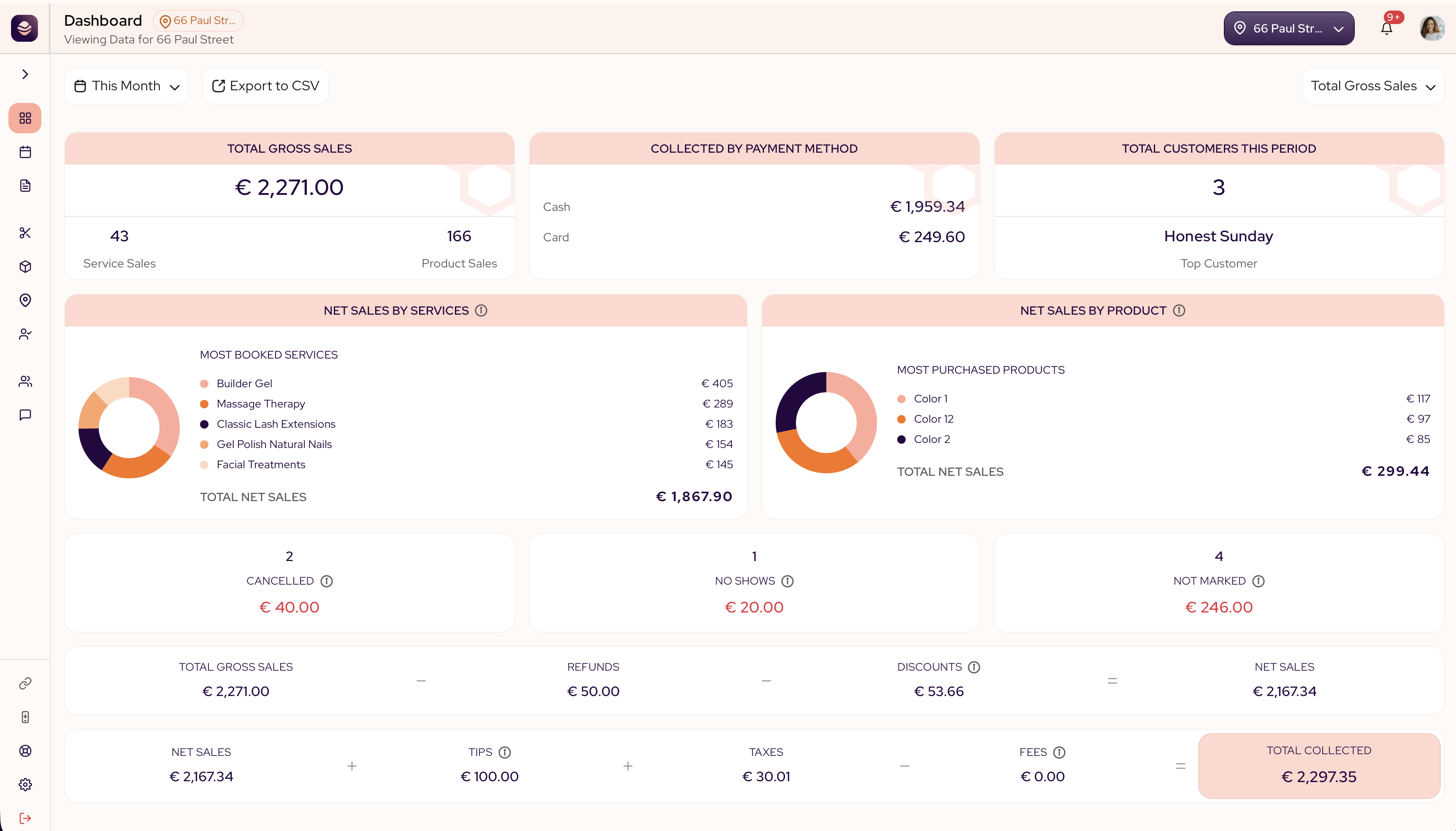
Total gross sales is the report your dashboard opens to. It shows the money in and the money out for the period, so you can read your salon at a glance and trust what you see.
In this article
- Your headline numbers
- How net sales and total collected are worked out
- The money that did not happen
- Change what you see
Your headline numbers
These are the cards across the top of the report.
- Total gross sales is everything the salon took in the period, before refunds, discounts and fees come out. Underneath it you'll see Service sales and Product sales — how many services and how many products were sold in the period.
- Net sales is what is left once refunds and discounts come out. This is the truest measure of what your work brought in.
- Total collected is the money that reached you in the end. It is net sales plus tips and taxes, less card fees.
- Collected by payment method splits that money by how it came in, cash or card. Use it to match your drawer at the end of the day.
- Total customers this period is how many clients the salon served in the date range. The top customer is the client with the most bookings in the period.
- Net sales by services ranks your top services by what they brought in.
- Net sales by product shows the same view for the products you sold.
Note: Money you kept from no-shows and late cancellations (forfeited deposits) is not included here — that's real cash, but not a service or product sale. It's tracked on its own in the Deposits report.
How net sales and total collected are worked out
The report shows the full sum, so nothing is hidden:
Total gross sales − refunds − discounts = net sales
Net sales + tips + taxes − fees = total collected
Here is what each piece means:
- Refunds is money you gave back to clients in the period.
- Discounts is every price you took off, including promotions and loyalty rewards.
- Tips is what your clients added, whether they booked online, paid at the register or paid in person.
- Taxes is the tax collected on top of the sale.
- Fees is the processing cost on card payments taken in person at checkout. It does not include processing costs on cards used for online bookings.
Tip: If net sales looks lower than you expected, check discounts first. Promotions and loyalty rewards live there.
The money that did not happen
These cards show the bookings that fell through, so your team can act on them.
- Cancelled is the appointments a client or the salon called off.
- No-shows is the clients who booked but did not turn up.
- Not marked is past appointments that no one has marked yet as completed, a no-show or cancelled. Mark them so your numbers stay true.
Note: Cancelled, no-show and not-marked appointments are not counted in total gross sales or net sales.
Change what you see
- Use the date range at the top to switch between this week and any other period.
- If your salon runs in more than one place, pick a location at the top right to see only its numbers.
- Use Export to CSV to take any period into a spreadsheet. You enter an email address and the file arrives there.
Updated 14 days ago
Did this page help you?