
Update an appointment
Keep your calendar and your numbers true.
Marking each appointment as it happens keeps your calendar clear and your dashboard honest. It is also how the salon tells apart a client who came, a client who paid and a client who never turned up.
In this article
- Change a status
- Why it matters
- What each status sets in motion
Change a status
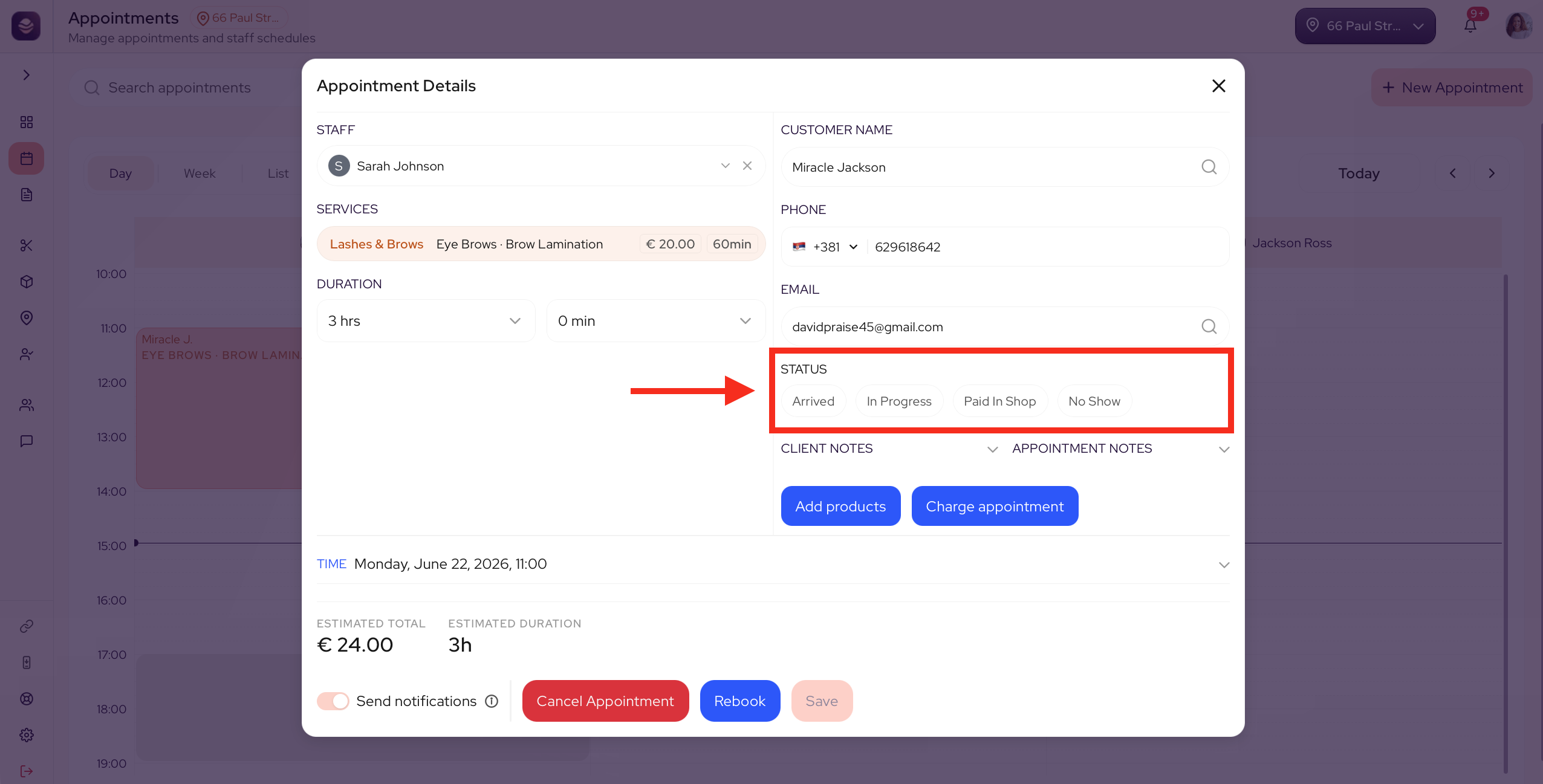
Open an appointment and set where it stands:
- Mark Arrived when the client walks in.
- Switch to In Progress when the service is under way.
- Choose Paid In Shop when the service is done and the client has paid in person.
- Set No Show when the client did not turn up.
Why it matters
Your dashboard counts paid appointments as sales. It also flags Not marked bookings, the past appointments no one has updated yet. Mark them, and your numbers tell the truth.
What each status sets in motion
If your salon has turned on aftercare tips or review requests in Engage, two of the statuses are what send them.
- Switching to In Progress is what sends aftercare tips.
- Choosing Paid In Shop is what sends the review request.
Arrived and No Show update your calendar only. They do not send anything.
Note: Aftercare tips and review requests only go out once you have turned them on in Engage. Marking a status will not send them on its own.
Updated 14 days ago
Did this page help you?