
Appointment report
Every booking, with all its detail
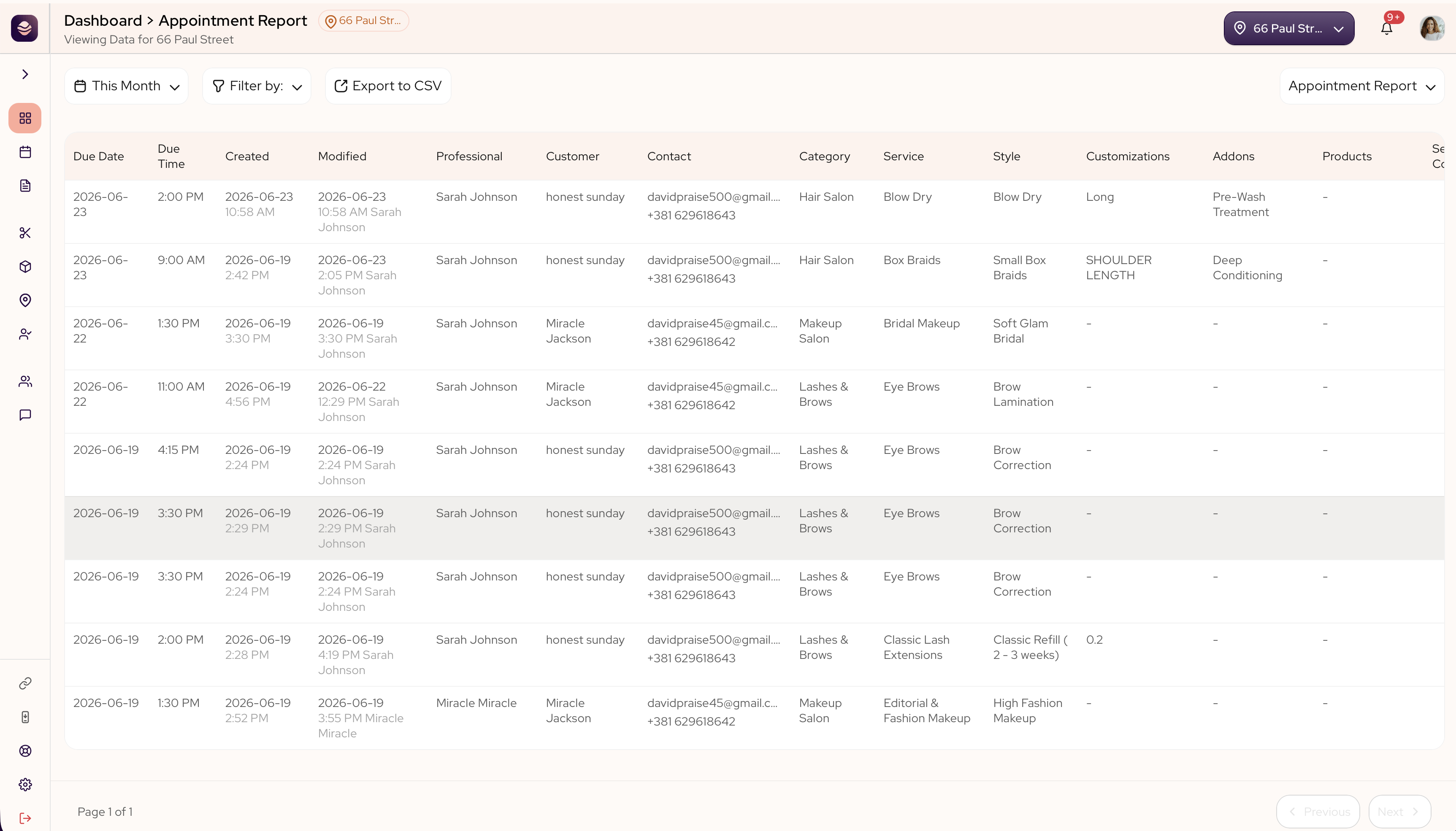
The appointment report is the full list of your bookings. When you need to find one appointment or check exactly what happened, this is where you look.
In this article
- What this shows you
- What each column means
- Narrow it down
- Export the full list
What this shows you
Each row is one appointment, from the date and the client to the service, the price and how it was paid. The filters let you narrow the list to the stylist, the payment, the booking method, the status, the platform or the date range you care about.
Picking a date range longer than 30 days switches the report to an export-only view — you won't see individual rows on screen, but you can still export the full list for that period.
If a date range holds more bookings than the report can show at once, a note at the top tells you how many you are seeing out of the total, so you always know whether you are looking at the whole picture. Choose a shorter date range to see them all.
What each column means
- Due date and due time are when the appointment is booked for.
- Created and modified are when the booking was made and last changed.
- Professional is the stylist on the appointment.
- Customer and contact are the client and how to reach them.
- Service, category and style are what was booked.
- Addons and customizations are the extra choices on top of the service.
- Products are any items sold with the appointment.
- Service cost is the price of the work.
- Tip is what the client added.
- Payment and payment method are how much was paid and how.
- Balance due is what the client still owes at the salon. When the payment reads Partial, this is the number to collect when they walk in.
- Booking type shows whether it came through your link or was added by the team.
- Status shows whether it is scheduled, completed, a no-show or cancelled.
- Platform shows where the booking came from.
- Rating is the score the client left after their appointment. It stays empty until the client rates a completed booking. Review is reserved for their written feedback, which doesn't appear in this report yet.
Narrow it down
Use the filters at the top to focus the list:
- Filter by stylist, payment, booking method, status or platform.
- Filter by date range.
Export the full list
Export to CSV asks for an email address and sends the file there, rather than downloading it in your browser. That way a long date range keeps building in the background instead of tying up the page.
The export covers the whole date range you picked, not just the rows on screen or the filters you have applied. If a range is large enough that even the export cannot hold all of it, the file opens with a line telling you how many rows it contains out of the total.
Tip: Export a period to keep a full record or share it with your accountant. For the money side — what was collected and when it reached your bank — see your deposits report.
Updated 14 days ago