
Loyalty
Reward your regulars with a punch card
SalonGrid's loyalty works like a punch card. After a set number of visits, a client earns a reward, so coming back to you pays off. It runs on its own as clients book and pay.
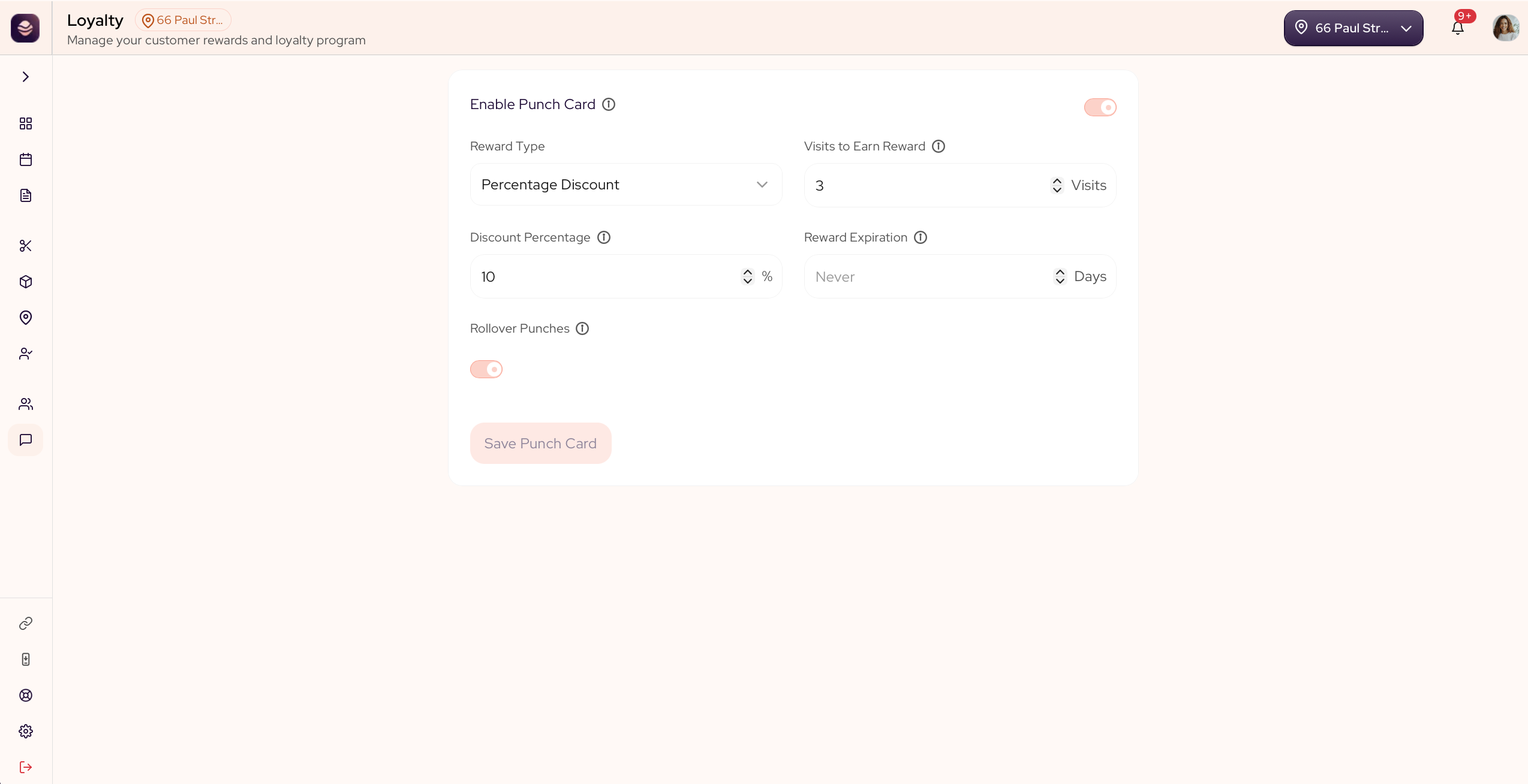
How the punch card works
A client collects a punch for each visit. When they reach the number you set, they earn the reward you chose, and the count starts again.
Set up your punch card
- Go to Engage and open Loyalty.
- Turn on Enable Punch Card.
- Choose a Reward Type:
- Free Service gives a service for free.
- Percentage Discount takes a percent off.
- Free Add-On gives an add-on for free.
- If you chose a discount, set the reward value, like 20 for 20% off.
- Set Visits to Earn Reward, the number of visits before the reward unlocks.
- Turn on Rollover Punches if you want extra visits to carry over after a reward is earned.
- Select Save Punch Card.
From now on, SalonGrid counts each client's visits, and your team gives the reward when it is earned.
Updated 21 days ago
Did this page help you?