
Take a tour of your dashboard
Your home base, and how to read it at a glance.
Your dashboard is home base. It opens to a clear picture of how the salon is doing, and the menu on the left takes you to everything else.
In this article
- Your numbers at a glance
- Finding your way around
- Switching location
- Where to go next
Your numbers at a glance

The moment you sign in, the dashboard opens to what the salon has brought in. Change the range at the top, switch report with the dropdown on the right and export any view with Export to CSV.
This is your money view, all in one place. For the full meaning of every figure and the other reports, see Total gross sales.
Finding your way around
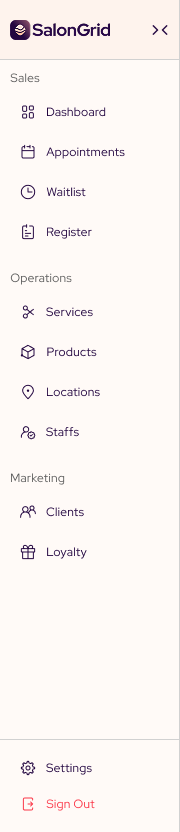
The menu on the left groups everything the way your salon works.
- Sales holds your dashboard, your appointments and your register.
- Operations holds your services, products, locations and team.
- Marketing holds your clients, loyalty, automations and discounts.
- Settings, your booking link and support sit at the bottom.
Switching location

If your salon runs in more than one place, the location name sits at the top right. Pick a location to see only its numbers, its appointments and its team.
Where to go next
That is your setup done. From here you run the day to day: take bookings from your calendar, charge walk-ins at the register, and keep your client list up to date.
If you have not shared your booking link yet, that is the one step worth doing first.
Tip: Use Export to CSV at the top to take any period into a spreadsheet for your records or your accountant. You enter an email address and SalonGrid sends the file there.
Related: Create an appointment · Take a payment · Total gross sales
Updated 14 days ago